
In short: Ask a question, get an answer. The Agent only sees what you already have permission to see, so its answers are scoped to your access.
Where to find the Agent
The Inspire Agent is available in three places, so you can use it in whichever way fits what you are doing:
- Homepage widget. Edit your homepage via the pencil icon in the upper right corner, then add AI Agent Chat as a widget. A quick-access entry point on your Inspire homepage. Use it for fast questions while you are getting oriented for the day.
- Full Screen & Side panel. Click the chat icon in the upper right corner of your screen next to the Global Search icon, then select Size. Expand the Agent to a full-page view, best for longer back-and-forth conversations or more detailed questions, or open the Agent beside the page you are already on, so you can ask a question without leaving your current module (for example, while viewing your Objectives).
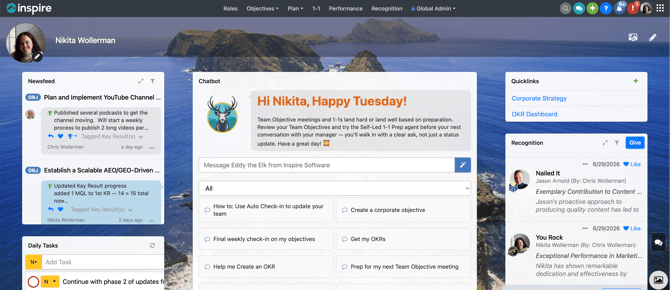
Starting a conversation
- Click the Inspire AI Agent Agent widget on your homepage, or open the Agent from the Chat Icon next to the Global Search icon.
- Type your question or request in the message box.
- Press Enter (or click Send) and the Agent replies with an answer based on your Inspire data.
- Ask a follow-up question in the same conversation to dig deeper. The Agent keeps the context of what you have already asked.
Onboarding Mode: If your administrator has enabled Onboarding Mode, the Agent greets you with a guided walkthrough to help you get started, which will point you to key areas of Inspire and answering your first questions.
Example questions you can ask:
- “What is the status of my Q2 objectives?”
- “What recognition have I received this quarter?”
- “How do I align a key result to a corporate objective?”
Using the Prompt Library
Open the Prompt library from the Agent to browse ready-made prompts. (This is the button previously labeled “Prompts.”)
Prompts are grouped into categories, including Strategy and Onboarding. Categories for modules your organization doesn’t use are hidden automatically.
Daily prompts appear in priority order, and the side panel surfaces prompts based on the module you’re in, so the most relevant suggestions appear first.
What you can ask about
The Agent is designed to help you find and understand information across Inspire. Common topics include:
-
Creating and updating objectives: the Agent can create or update objectives and set a contributor’s objective priority, following your organization’s visibility settings.
- Objectives and OKR progress, including where things stand and what is due.
- Your check-in history and current status.
-
Corporate strategy: review corporate objectives and create or update corporate strategy and corporate key results.
- Strategy and corporate objective questions, such as what a key result rolls up to.
- Drafting performance comments: review your performance cycle, competencies, and value definitions, and draft contribution & improvement comments for you to review.
-
Building a 1-1 agenda: assemble a 1-1 agenda for a specific week and add the agenda summary to your 1-1 when new messages are posted.
-
1-1 agenda and meeting preparation.
-
- Recognition activity you have given or received.
- General navigation help, such as where to find a feature or how to complete a task.
Tips for better answers
- Be specific. “How are my objectives tracking this quarter?” works better than “How am I doing?”
- Include details like a time period, a team, or a specific objective to narrow the answer.
- If an answer is not quite what you expected, rephrase the question or add more context and ask again.
Good to know
- The Agent uses your Inspire permissions, so it only returns information you are already allowed to see.
- Answers are scoped to your access level. Two people can ask the same question and see different results based on their permissions.
-
When the Agent drafts something for you: such as a performance comment or an objective, so always review it before saving. Nothing is written to Inspire without your confirmation.
- AI Usage Limits: AI usage may be limited by credit caps set by your administrator. If you reach a limit, including during a single conversation, the Agent will let you know, and AI features become available again when the cap resets. Contact your administrator if you need a higher limit.
- If the Agent does not appear for you, it may not be enabled for your organization yet. Check with your Inspire administrator or reach out to us at support@inspiresoftware.com.