
Overview
When viewing the side panel for an individual or team objective, you can use the Recognize option to easily send an award to the objective owner or contributors, pre-filling the recognition message with the objective's title. This functionality is the same as the 'Recognize' capability found on the OKR progress widget.
Step-by-Step Guide
Follow these steps to send recognition related to a specific objective and key results:
1. Access the Objective Side Panel
-
Navigate to the individual or team objective you wish to recognize.
-
Click on the objective title to open the side panel view.
2. Select 'Give Recognition'
-
Within the objective side panel, locate the Key Result.
-
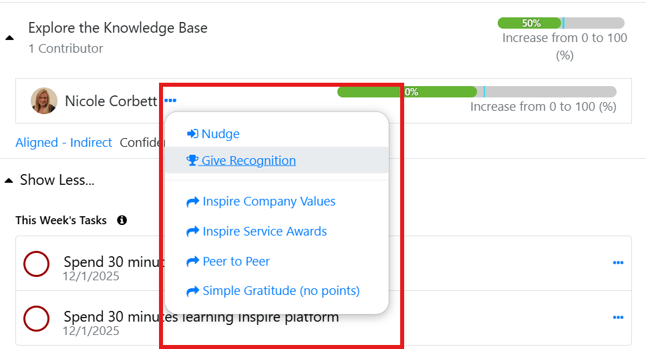
Expand the Contributor(s) list and click on the Ellipsis (...) next to the contributor you want to recognize.
-
Click the Give Recognition button or tab.
3. Select a Recognition Program
-
A list of available recognition programs will appear.
-
Select the appropriate recognition program from the list.
4. Complete the Recognition Modal
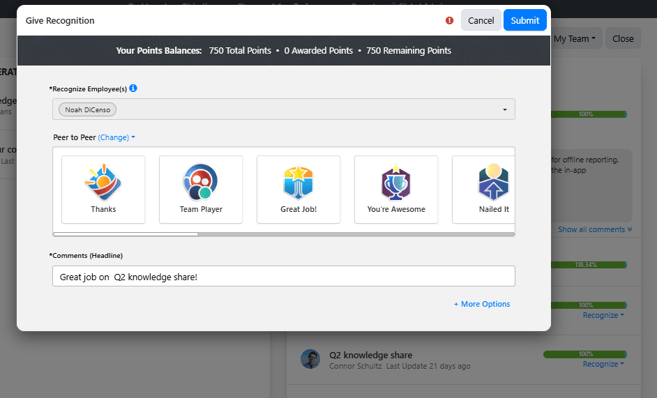
Upon selecting a program, a recognition modal will open with the following fields pre-filled or available for input. Fill all the required details and click on Submit.
Please reach out to support@inspiresoftware.com with any questions.