
Steps to Access an Archived Performance Review:
- Navigate to Performance
- From the Performance dashboard select the Select a Cycle drop down
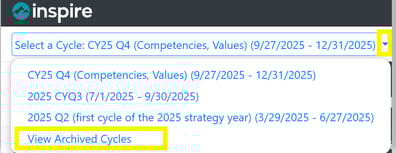
- Select Archived Cycles
- A list of archived performance cycles will appear

- Select an archived cycle to open it
- Review the events and historical data within the cycle
Note: All archived performance cycles are read only and cannot be edited submitted or signed off.