
Click to skip to each Version history below:
- 2026
- 2025
- 2024

Inspire Software 10.1 Release
Inspire Version 10.1 introduces a set of enhancements designed to improve how organizations connect strategy, goals, and performance within a single execution system. This release focuses on increasing alignment, visibility, and usability—helping teams move more efficiently from planning to measurable results while giving leaders clearer insight into progress.
This update strengthens long-term strategy execution through improved structure and alignment of corporate objectives, while also streamlining how teams create and manage OKRs. New capabilities in Objective Explorer add greater organization and scalability, and updates across continuous performance management, 1-1 meetings, and Team Details enhance collaboration and execution workflows.
Here are a few top features in this release:
- Explorer folders to organize and scale Objective Explorer views
- Quick Add Objective to streamline OKR creation and reduce setup time
- Configurable periods for corporate objectives to better align long-term strategy timelines
- Enhanced Team Details with improved agenda management, task updates, and collaboration tools
- Improved performance management workflows for greater accuracy and clarity
- Enhanced 1-1 meeting experience with better context and access to key results
Corporate Strategy & Corporate Objectives
Value: These updates make it easier to maintain strategic integrity over time, ensuring that long-term priorities remain aligned, measurable, and visible across the organization. Leaders gain clearer insight into progress, while teams stay anchored to the right timelines and outcomes.
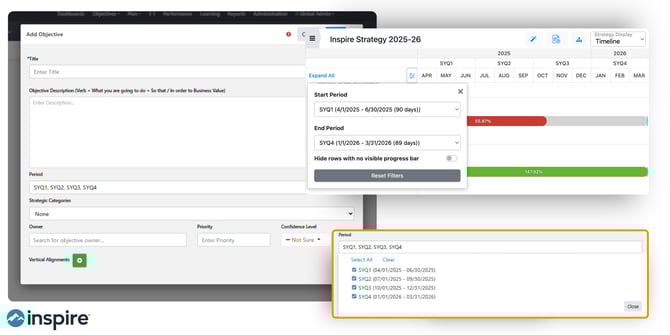
This release strengthens the foundation of long-term strategy execution by improving how corporate objectives are structured, aligned, and visualized.
- Added the ability for admins to set start and end dates for corporate objectives using configurable periods, ensuring alignment with long-term strategic timeframes.
- LTKR and CKR dates now default to and are constrained within their parent corporate objective's date range, preventing misalignment in the strategy timeline.
- Updated corporate objective progress calculations to better reflect long-term progress by averaging LTKRs and unrelated CKRs.
- Period filters in strategy views now apply to corporate objectives in addition to LTKRs and CKRs, providing more precise filtering across strategy boards, lists, and timelines.
- Completed the strategy timeline view with enhanced filtering and visualization capabilities.
- Added dedicated side panels for LTKRs and CKRs, replacing modals with a richer view of details, aligned items, and recent check-ins.
- Corporate objectives in the strategy narrative and alignment modals are now grouped and sorted by strategy category and priority for easier navigation.
- Numeric details are now enabled by default in the hierarchy view, reducing the need to manually toggle them on.
Objectives (Goals/OKRs)
Value: Teams can now move faster from idea to execution, with improved flexibility and clarity in how goals are defined and managed. This reduces setup time while improving alignment to broader strategic priorities.
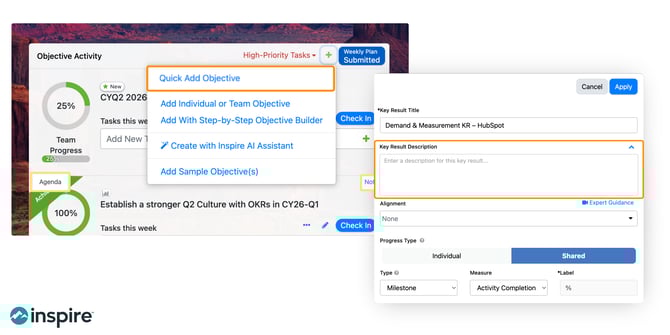
Enhancements to OKR creation and management streamline how teams define, align, and update goals—reducing friction and improving clarity.
- Introduced Quick Add Objective, allowing users to rapidly draft OKRs with a title, dates, and key results directly from the widget or objectives page.
- Key results now support an optional rich text description field, visible in the edit panel, objective side panel, and team details.
- Added the ability to edit key result titles directly in the KR edit panel alongside other fields.
- Improved the logic for assigning contributors to all key results so that existing multi-contributor KRs retain their progress type setting.
- Corporate objectives in the alignment modal are now grouped by strategy category for easier selection.
Objective Explorer
Value: As organizations scale, these updates help maintain clarity and organization across complex goal structures, making it easier for teams to find, manage, and act on the views that matter most.
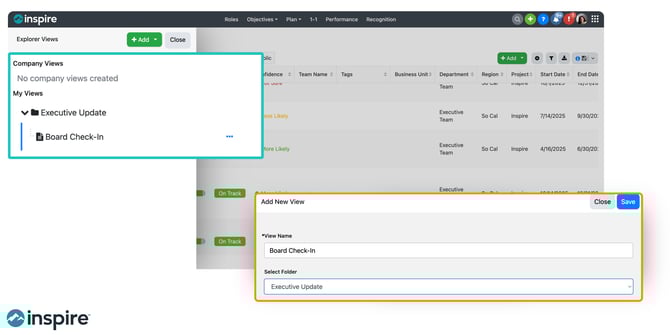
New organizational capabilities bring greater structure and scalability to how users navigate and manage OKR views.
- Added folder support to the Objective Explorer, allowing users to create, rename, and delete folders to organize views.
- Explorer views can now be moved into folders via a new Move option, with folders displayed alphabetically above ungrouped views.
- Folder management options (rename, delete) are available to view owners and admins, with views preserved if a folder is deleted.
Performance
Value: These improvements create a more streamlined and accurate performance workflow, helping leaders focus on meaningful evaluation and coaching—while ensuring performance data reflects true progress.
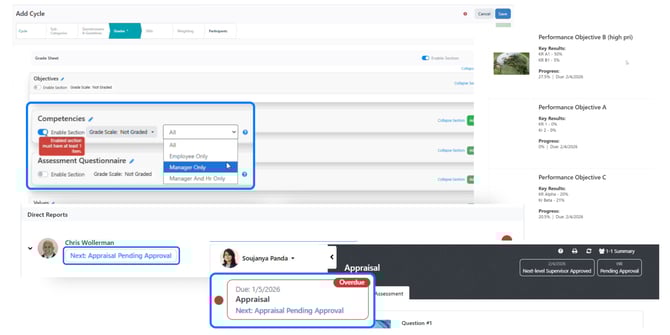
This release enhances the accuracy, clarity, and workflow of performance processes—ensuring better alignment between performance and strategy.
- Supervisors can now see a "Pending Approval" status on appraisals awaiting next-level supervisor or HR approval, visible in both the supervisor dashboard and direct report event views.
- The Prepare Appraisal action item is now automatically removed when an appraisal is pending approval and restored if rejected, reducing unnecessary action items for supervisors.
- Comment fields in performance events now display only for the responsible party based on section visibility settings (employee-only or supervisor-only).
- Overall scores in the Performance Summary Report are now excluded until the appraisal is submitted, preventing incomplete scores from appearing.
- Objective order in performance print views now matches the order displayed in events, sorted by priority then title.
1-1
Value: Managers and employees can now have more focused, context-rich conversations, directly connecting discussions to goals and outcomes.
Updates to 1-1 meetings improve clarity, context, and access to goal-related information during conversations.
- Agent-posted agendas in 1-1s now include supervisor/direct report labels so users can quickly identify which user’s agent generated the agenda.
- Replaced the info button in 1-1s with a "Key Results" button that opens the objective side panel for easier access to KR details.
Team Details
Value: Teams benefit from more structured, efficient collaboration, with improved tools to manage meetings, track progress, and maintain context over time.
Enhancements in Team Details improve collaboration, meeting preparation, and visibility into team progress.
- Admins can now create and manage agenda suggestions for team OKR meetings, with a dedicated section in Admin settings.
- Team OKR owners and contributors can now use admin-configured suggestions when building agendas in Team Details.
- Tasks in Team Details can now be edited and marked complete/incomplete directly from the Objective Progress tab.
- Rich text formatting is now preserved when viewing status updates in the Team History tab.
Newsfeed
Value: Users can now quickly identify what matters most—wins, risks, and key initiatives—improving visibility and enabling faster, more informed decisions.
New filtering capabilities make it easier to surface relevant updates and insights across the organization.
- Added a Flag filter to the newsfeed, allowing users to filter check-ins by Win, Setback, or Initiative.
- Added the ability to filter the newsfeed by check-in type: Strategy, Objective, or Role check-ins.
- Newsfeed filters have been reorganized into a side panel with an Apply button.
Reports
Value: Leaders gain more timely, structured, and actionable insights, making it easier to monitor execution and identify trends across teams and strategy levels.
Reporting enhancements provide more timely access to insights and improved data organization.
- An in-app pop-up notification now appears when an offline report is ready for download, with a direct link to the report.
- Strategy-level check-ins (LTKR/CKR) are now included in the Check-in Summary Report, with proper grouping by team, business unit, or department.
- Check-ins in the Check-in Summary Report are now sorted by date (most recent first) within each grouping and flag type.
- Key results in the OKR Summary Report now display in the order set by the objective owner.
Additional Enhancements
Value: These enhancements provide greater flexibility, transparency, and real-time control, allowing users to adapt the platform to their workflows and access insights exactly when needed.
Additional improvements across the platform increase flexibility, usability, and real-time responsiveness.
- Users can now select an entire Planner plan to drive KR progress, with tasks dynamically updating as new items are added in Planner.
- Hovering over "X days ago" on conversation comments now displays the actual date and time the comment was posted.
- Expanded dashboard widget size options, now supporting sizes from 1x1 up to 20x20 for greater layout flexibility.
- Users can now run AI agents on demand from the Profile > Agents tab, including the Recognition, Plan, and 1-1 Agenda agents, without waiting for the next scheduled cadence.
Bringing It All Together
Version 10.1 continues to advance Inspire Software’s core mission: helping organizations connect strategy, goals, and performance into a unified execution system.
With stronger alignment controls, improved visibility, and enhanced usability across the platform, this release enables teams to:
- Maintain alignment from long-term strategy to daily work
- Improve clarity and accountability across goals and performance
- Gain real-time insight into execution progress
- Operate with greater speed and confidence
Whether you’re refining your strategy execution approach or scaling it across the organization, these updates are designed to help you turn strategy into measurable results—more consistently and effectively.

Inspire Software 10.0 Release
Smarter Performance, Deeper Alignment, and More Control Across Execution
Inspire Software Version 10.0 delivers meaningful enhancements across performance management, OKRs and strategy execution, AI-assisted planning, reporting, and overall usability. This release is designed to help organizations reduce administrative friction, increase clarity and consistency, and better connect day-to-day work to strategic outcomes.
In order to maximize value for all of our users, Inspire 10.0 reflects our continued focus on practical innovation that supports real leadership workflows.
Here are a few of our top features in this release:
- Expanded functionality in Performance Cycles
- Team OKR Notes and Agendas with AI Assistance
- Additional tools to build and view Corporate Strategies
- Offline Reports that run in the background to save time
- Expanded capabilities in Surveys including long text and NPS rating scales
Performance
More Flexible, Transparent, and Insight-Driven Performance Cycles
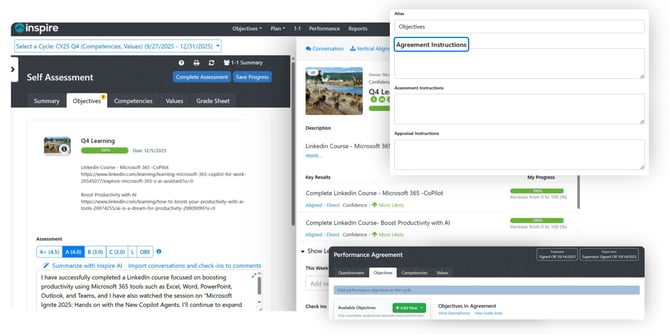
Value: Save time, increase effectiveness, and ensure performance conversations reflect real work and progress.
Inspire 10.0 introduces significant improvements to performance cycles, assessments, and appraisals. Leverage more control, clarity, and confidence in performance processes.
What’s new:
- Clear instructions can now be added directly to tabs within performance cycle events, helping guide employees and managers through each step of the process.
- Objective 1-1 conversations are automatically included in 1-1 summaries for self-assessments and appraisals, ensuring important context isn’t lost.
- Archived performance cycles are now accessible directly within the Performance module, improving historical visibility.
- While typing self-assessments and appraisals, users can view objective details and key results in context—keeping feedback grounded in measurable outcomes.
- Expanded details are now available on grade sheets and throughout the appraisal approval process for greater transparency.
- Performance cycle sections can be configured as manager-only, employee-only, or private (manager and HR only), supporting sensitive feedback and governance needs.
- Admins can customize fields on the Summary tab, including contribution and improvement comments.
Together, these updates make performance reviews more accurate, consistent, and reflective of ongoing work—rather than one-time snapshots.
Objectives (Goals/OKRs) and Corporate Strategy
Greater Control, Better Collaboration, and Faster Execution
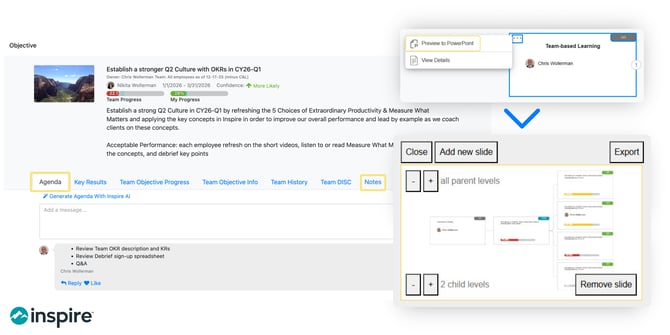
Value: Strengthen alignment, improve contributor engagement, and reduce friction in strategy execution.
Inspire 10.0 enhances how objectives, key results, and strategic conversations are created, managed, and acted upon.
What’s new:
- Organizations can now enable or disable automatic KR weight balancing by default, allowing teams to decide whether weighting is system-managed or manually set.
- Objective conversations have been expanded to support:
-
- Conversations on individual OKRs
-
- @mentions for non-contributors (with notifications)
-
- Rich text formatting for clearer, more contextual discussions
- Leaders can now recognize and nudge objective contributors directly, which reinforces accountability and momentum.
- Add custom messages when nudging users, making reminders more contextual and human.
- New Agenda and Notes tabs in Team Details improve meeting preparation and documentation for Team Objectives.
- Search for queries, files, and reports when configuring KR integrations—making data connections easier to find and manage.
- Copy a CKR to reuse recurring key results across periods without rebuilding them from scratch.
- Actions are available directly within the strategy list view for faster navigation.
- Export the full strategy hierarchy to support offline reviews, leadership discussions, or external reporting.
- Open OKR details directly by clicking a key result tile in the hierarchy for faster exploration.
- Numeric CKR start and target values are now visible when aligning individual and team key results, improving setup accuracy.
These updates help teams move from planning to execution with fewer barriers and clearer accountability.
Reports
Cleaner Access and Improved Visibility
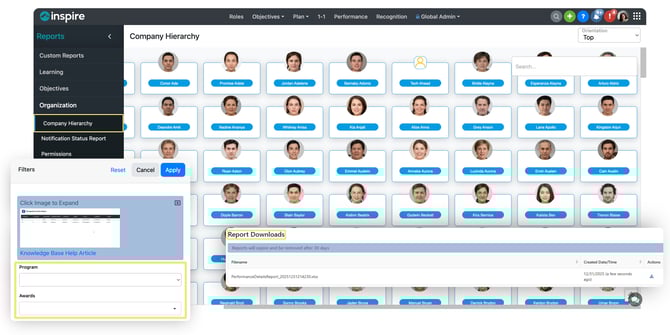
Value: Simplify reporting workflows while improving clarity and consistency.
What’s new:
- Certain reports are now available exclusively as downloads, accessible from the report download page or delivered via email notifications—reducing UI clutter while preserving access.
- The Company Hierarchy report features a refreshed UI.
- A new program and award filter has been added to the Recognition Activity report, making it easier to analyze recognition trends and participation.
Surveys
More Flexible Feedback and Better Analysis
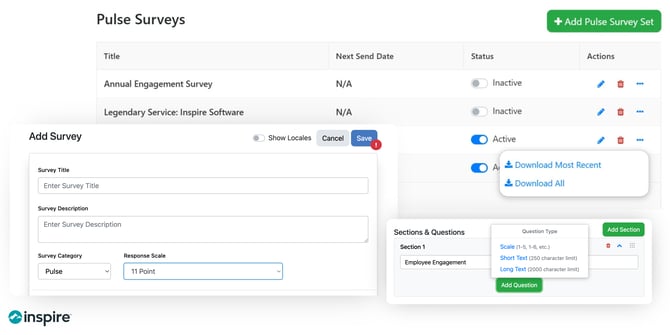
Value: Capture richer employee sentiment and analyze results more effectively.
What’s new:
- Pulse Surveys now support both short- and long-text response questions, allowing for more qualitative feedback.
- A new 11-point scale has been added to support NPS-style surveys.
- Survey responses can now be downloaded directly into Excel for deeper analysis and sharing.
Inspire AI
Smarter Meeting Preparation with Less Manual Work
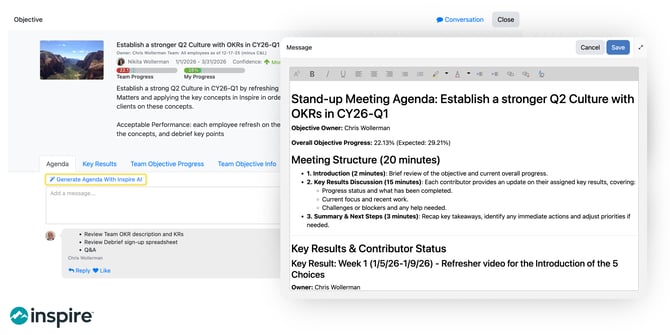
Value: Help leaders show up prepared and focused, without extra effort.
What’s new:
- Inspire AI can now generate agendas for Team OKR meetings, using progress, priorities, and context to help teams focus discussions on what matters most.
General Updates
Improved Usability, Filtering, and Navigation
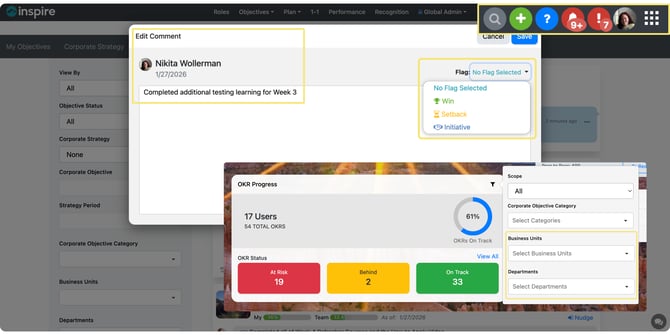
Value: Faster access to insights and easier day-to-day management.
What’s new:
- Generic filters for departments and business units are now available in the Check-In Status widget and OKR Progress widget.
- Flags can be added or edited directly when editing a check-in, improving visibility and follow-up.
- Admins can filter users in User Management by common attributes such as departments, business units, etc.
- A refreshed navigation menu and search make it easier to find what you need, when you need it.
Moving Forward with Inspire 10.0
Inspire Software 10.0 strengthens the foundation of strategy execution by making performance more connected, goals more actionable, AI more practical, and the overall experience more intuitive. These updates are designed to help organizations operate with greater clarity, consistency, and confidence.
If you’d like to explore how these updates apply to your organization or see them in action, please reach out to your Client Success Representative or request a personalized walkthrough. We’re excited to continue building alongside you.
If you missed our previous releases in 2025, here are links to the highlights:
9.3 Release: AI Agents, Corporate Objective Privacy, Team Objective workflow, more
9.2 Release: Strategy List View, Strategy Department & Business Unit Filters, Explorer Enhancements, more
9.1 Release: Objective Tags, 1-1 Agenda Summaries & Conversations with Inspire AI, Customize Performance Cycles & Download Appraisals, more
9.0 Release: New Objective Explorer, Strategy Narrative updates, Public Objective Conversations, more

Inspire Software 9.3 Release
Inspire Version 9.3 delivers one of our most forward-thinking updates yet, and designed to make strategy execution smarter, faster, and more connected across your organization. From AI-driven productivity to deeper strategy control, enhanced integrations, and a smoother user experience, this release empowers leaders and teams to operate with clarity, speed, and impact.
Whether you're an existing client or exploring platforms to level up your strategy and OKR execution, these updates showcase Inspire’s ongoing commitment to innovation and real-world business value.
Inspire AI: Automation That Drives Strategy Forward
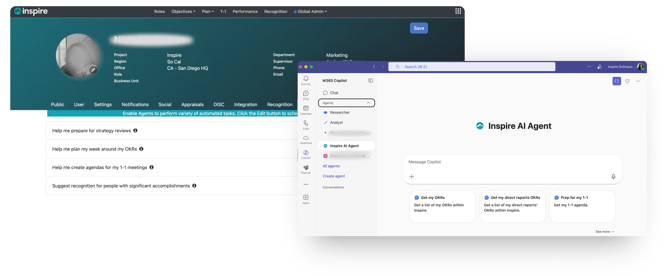
Value: Boost productivity, reduce admin overhead, and make strategy execution more responsive across every level of your organization.
Inspire Agent for Microsoft Copilot & Teams (BETA Version): Interact with Inspire directly through your existing workflows. Use Copilot and Teams to ask questions, create tasks, update progress, and more—without opening the app. Watch a short video clip on this new feature.
In-App Automated Agents (BETA Version): Inspire now includes an Automated Agents tab in the User Profile Dashboard with four powerful assistants designed to handle routine tasks and keep strategy execution moving—without manual effort. Here’s what the first set of agents can do:
- Strategy Review Prep Agent: Automatically compiles updates on your corporate objectives and delivers them to your inbox on a schedule you choose—perfect for weekly check-ins or monthly business reviews.
- Weekly OKR Planning Agent: Reviews your current work, progress, and gaps, then suggests high-impact tasks to focus on each week so you can stay aligned and prioritize effectively.
- 1:1 Agenda Builder Agent: Sends a weekly overview of your direct reports’ progress, suggested coaching areas, and key focus points—helping you walk into one-on-ones prepared and informed.
- Recognition Suggestion Agent: Surfaces notable accomplishments from check-ins and recommends recognition messages or awards—making it easy to acknowledge great work consistently.
Let AI take care of administrative essentials. These agents reduce the need to manually dig through updates, reports, and feeds, which helps teams focus on decisions, not manual work. Watch a short video clip on this new feature.
Corporate Strategy
More Control, Clarity, and Strategic Alignment
Value: Maintain strategic integrity while enabling nuanced alignment and visibility where it matters most.
- Private Corporate Objectives: Set access rules to control who can align and who can view high-level objectives—ideal for sensitive initiatives, executive-only work, or phased rollout strategies. Watch a short video clip on this new feature.
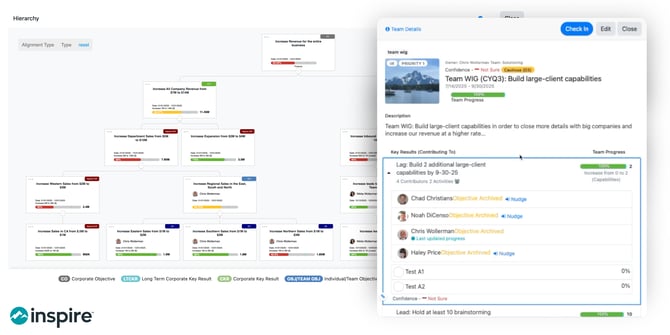
- New Strategy Hierarchy View: A cleaner, more intuitive visual structure makes it easier to see how objectives and key results connect across levels. Watch a short video clip on this new feature.
- CKR-to-CKR Alignment Across Strategies: Enable more sophisticated nesting and linkage between strategies for divisions, departments, or business units. Watch a short video clip on this new feature.
- Corporate Objective Side Panel: View progress, contributors, and status updates—without losing your place in the strategy view. Watch a short video clip on this new feature.
Objectives
Greater Flexibility and a Better Contributor Experience
Value: Easier collaboration, smarter measurement, and faster reporting across teams and functions.
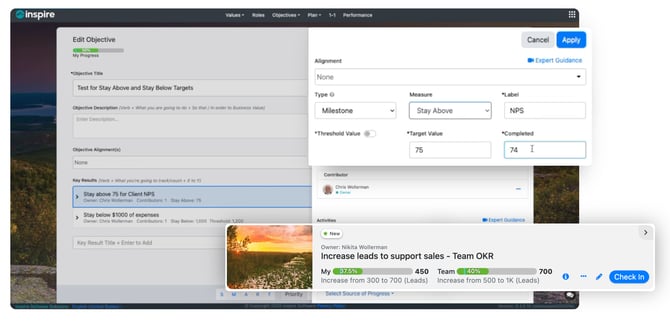
- Updated Team Objective Workflow: When a team objective is published, contributors are automatically notified—no more accept/decline steps required.
- New Key Result Types: For metrics that must stay above or below a threshold (e.g., “Maintain NPS above 70” or “Keep churn below 5%”), you can now set directional KR types that don’t rely on start-to-target progression. Watch a short video clip on this new feature.
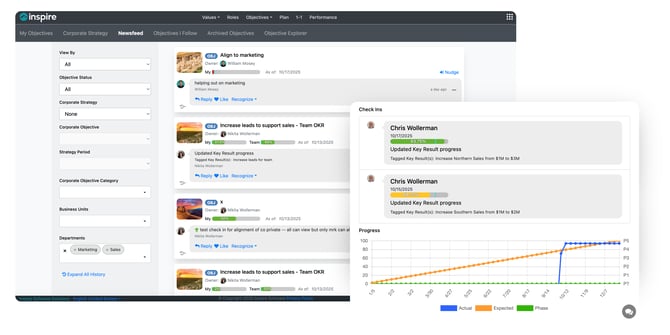
- Newsfeed Filters for Departments & BUs: Quickly filter check-ins by department or business unit for better visibility across teams.
Integrations
Connect Performance Data to the Tools You Already Use
Value: Close the gap between insights and execution with live data and seamless workflows.
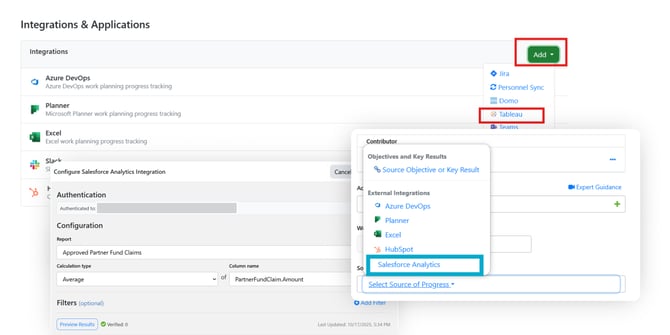
- Tableau as a Data Source for KR Progress: Beyond dashboard embeds, you can now feed progress directly from Tableau reports into metric-based key results.
- Salesforce Analytics Integration: Pull real-time data from Salesforce reports to automate KR tracking and eliminate manual updates.
- Enhanced Inspire for Teams App: Access all Inspire modules without leaving Microsoft Teams—strategy, OKRs, check-ins, and more.
Additional Enhancements
More Refinements for a Smoother Experience
Value: Increased efficiency, reporting accuracy, and user experience across day-to-day interactions.
- Admins can now set a default strategy view for all users.
- Appraisal downloads now include objective details for better performance insights.
- The Newsfeed shows both team and individual progress.
- Add precision with new start/end date filters in Objective Explorer.
- Quickly access all contributor check-ins from the side panel of a team objective.
- Minor UI improvements across modules enhance clarity and usability.
Ready to See What’s New?
Inspire 9.3 combines cutting-edge AI functionality, flexible strategy governance, and deeper data connectivity––delivering a platform that not only supports your goals but accelerates them.
If you'd like a walkthrough of the new features or early access previews of what's coming next, please contact your Client Success Representative or Click here to Book a Personalized Demo! We're here to make adoption seamless and impactful.

Inspire Software 9.2 Release
We are thrilled to announce the latest features in our 9.2 release, which are designed to provide you with a more intuitive, efficient, and secure experience. Stay tuned for more exciting updates as we continue to enhance Inspire Software.
Highlights
Strategy List View
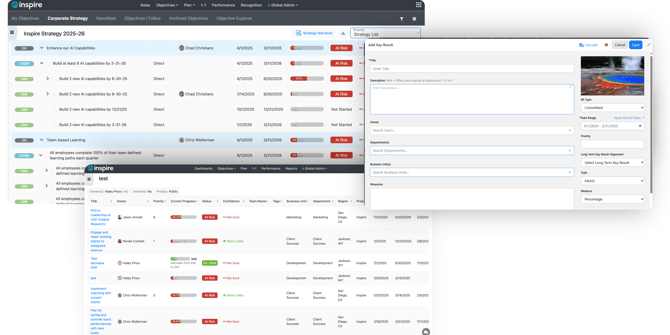
Complete Strategic Clarity in One View: You asked for better visibility into how objectives align across your organization—and now it’s here.
- View all alignments in a nested, hierarchical list—Corporate Objectives down to individual and team Key Results.
- See key context at a glance: owner, progress, dates, and alignment type.
- Ideal for executives, managers, and contributors looking to track progress and alignment quickly.
Strategy Department & Business Unit Filters
Filter for sharper reporting and alignment: new strategy tools ensure your goals stay connected to your company’s direction, no matter how complex your org structure gets.
- Strategy Filtering by Department/BU: Tag CKRs and LTKRs by department or business unit. Selected association(s) / tag(s) will drive filtering for the strategy and strategy reports. Department and business unit filters will show or hide strategic key results rather than dynamically changing progress based on aligned users in the department or business unit.
Explorer Enhancements
Data That Works the Way You Do: Personalized reporting means less digging, more doing. It’s the power to track what matters—your way.
- Saved Views in Explorer: Create and save multiple custom views beyond the default. Admins can build organization-wide views, while individual users can create personal ones for day-to-day focus. Save filters and columns to return to exactly the data you need.
Permission Management
Smarter Access Control, Less Manual Work
- Group-Based Permissions: Manage permissions by group instead of individual users. Quickly view who has Admin rights and update access with ease.
Corporate Strategy
Strategy-to-Strategy Alignment
Connect Every Level of Strategy to the Bigger Picture: Great strategy isn’t static—it’s layered.
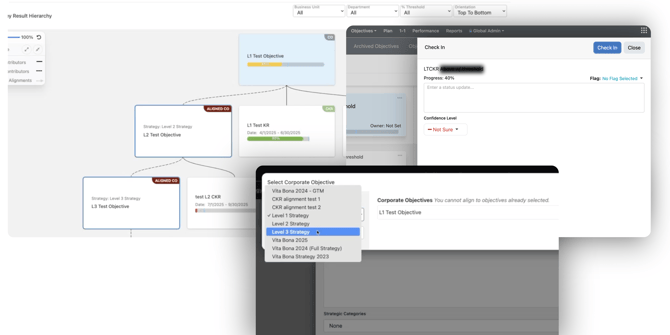
- Create distinct strategies and connect them to a top-level organizational strategy. Establish vertical alignments to maintain multiple levels of hierarchy or specific department/division strategies linking to an overall strategy to ensure alignment from team-level outcomes all the way to the executive vision.
Further Strategy Enhancements
- Key Results will now serve as the lowest level nodes in the Strategy Hierarchy instead of contributors—making structure simpler and more consistent.
- See the number of contributors directly on Objective and Key Result tiles for greater clarity on who’s involved.
- Update progress for overridden LTKRs and CKRs directly within Check-Ins for smoother weekly workflow.
- Numeric Key Results can now align directly to Percentage-based CKRs, enabling more flexible structuring across measurement types.
- Progress may now be averaged in addition to being summed for numeric LTKRs and CKRs, improving the flexibility of reporting.
Objective Enhancements
- Users can now remove KR alignment from the objective level vertical alignment drop-down menu.
- Key Result Simplifications:
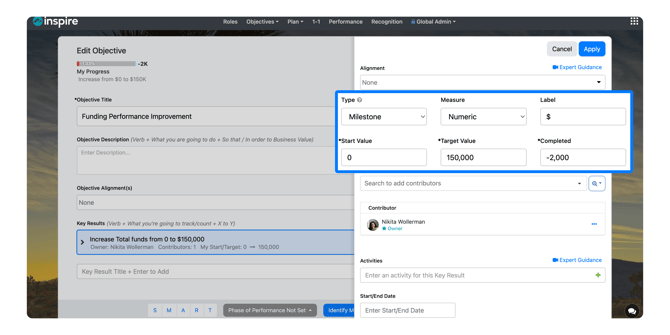
- Owners can update completed units while setting up or editing key results
- Now add negative values in start, target, or completed fields
-
- Enable KRs to vertically align to CKRs even when directionality differs (e.g., increasing to decreasing)
Reports
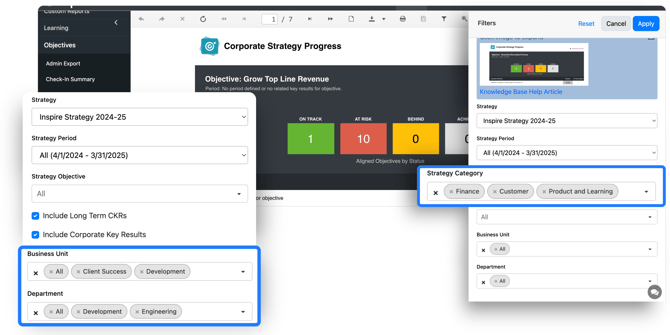
- Multi-select filters added for Departments and Business Units in Objective Reports.
- Filter strategic objectives by category for more targeted insights.
Additional Enhancements
1-1
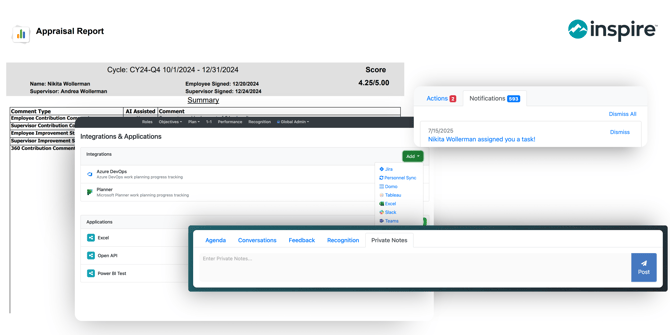
- Private notes in 1-1s can now be edited or deleted, giving users better control over personal reflections and follow-ups.
Integrations
- CRM Integration Enhancements: Introducing a new standardized experience across CRM integrations to streamline setup and usability.
Performance
- Revised Appraisal Downloads: Now includes sign-off dates and full comment history for more complete and transparent reviews.
Notifications
- Task Assignment: New notifications alert users when tasks are assigned—helping teams stay on track and accountable.
- OKR Progress: New alerts to help users stay accountable and update key result progress on time.
These updates are designed to provide you with a more intuitive, efficient, and secure experience. Stay tuned for more exciting features in the future!
If you have any questions about our newest features and updates, please contact us at support@inspiresoftware.com.

Version 9.1 Release
We are thrilled to announce the latest features in our 9.1.0 release, which are meticulously designed to provide you with a more intuitive, efficient, and secure experience. Stay tuned for more exciting updates as we continue to enhance Inspire Software.
Corporate Strategy
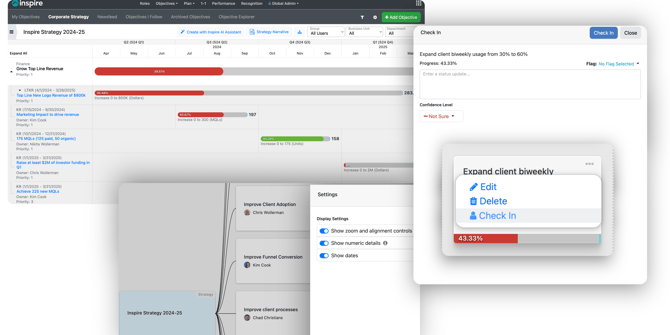
Hierarchy display settings: Customize your view by showing or hiding numeric KR details, dates, and the hierarchy controls to suit your strategic needs.
Strategy timeline display settings: Tailor your timeline with the option to show or hide the corporate objective owner, strategic key result owner, and dates, offering a clear overview of progress.
Check-in on strategic key results: Seamlessly enter status updates for CKRs or LTKRs and instantly post to the Newsfeed, keeping everyone in the loop.
Additional Strategy enhancements:
- Monitor actual units complete with ease.
- Identify private OKRs with a simple icon.
- Effortlessly adjust or remove alignment team objectives directly from the strategy hierarchy.
- Show or hide priority and numeric details from the timeline for a refined focus.
 Objectives
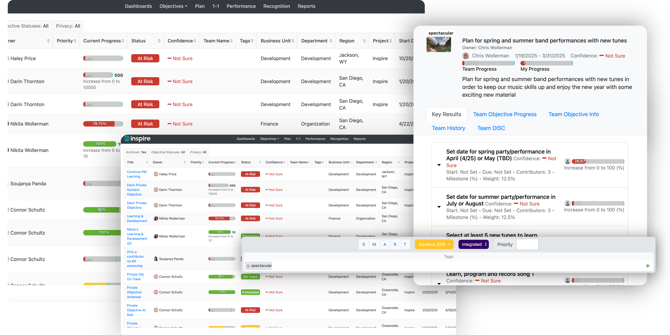
Objective tags: Enhance your organization by tagging OKRs and filtering by tags in the explorer, making it easier to track and manage objectives.
Observer check-ins: Empower users not directly contributing to key result progress to provide valuable status updates.
Additional Objective enhancements:
- Recognize check-ins easily from the objective side panel.
- View key result dates in read-only objective views, enhancing transparency.
- Ensure new team KRs are defaulted to Shared progress, fostering collaboration.
Objective Explorer
Privacy filter/column and Project filter/column: Refine your search and organization with the addition of Privacy and Project filters/columns, making your explorer more intuitive.
 1-1
1-1
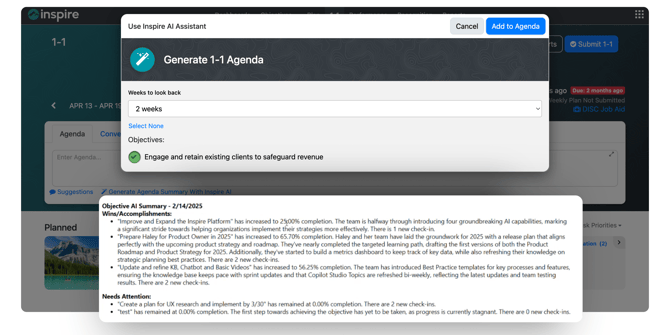
Generate an agenda summary with Inspire AI: Quickly draft an agenda summarizing the status of objectives with the help of Inspire AI, streamlining your preparation.
Initiate a conversation in the 1-1 with Inspire AI: Easily start a conversation with your manager in the 1-1, using Inspire AI to create draft suggestions for a smooth dialogue.
Performance
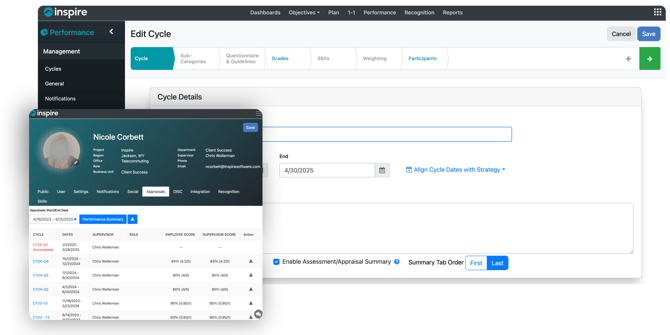
Performance Cycle customizations: Administrators can now disable the grade sheet for a cycle and adjust the placement of the Summary tab, offering greater flexibility in managing performance cycles.
Download appraisals: Download a PDF version of an appraisal in the Performance module or profile. Admins can download specific user appraisals (active or archived) or export all appraisals for any cycle, with downloads provided as .zip files containing one file per cycle participant.
Plan
Reassign tasks: Seamlessly reassign tasks, ensuring efficient task management if task assignment is enabled for your organization.
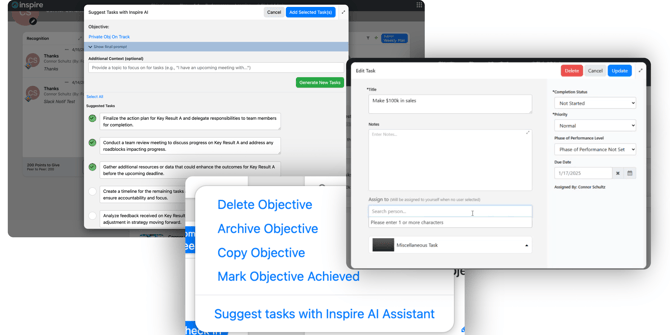
Suggest tasks with AI Assistant: Propel your OKR progress forward by generating high-impact tasks from the Objective Activity widget or Weekly Plan, thanks to our AI Assistant.
Reports
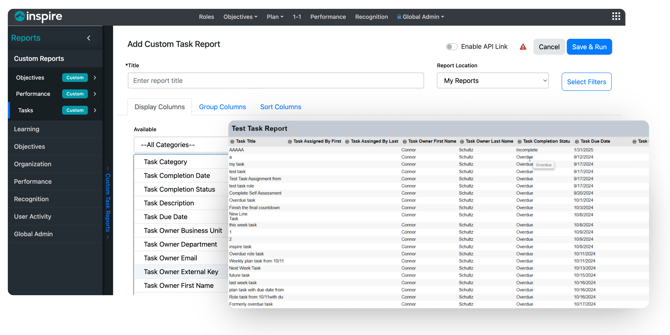
Custom Task Report: Create personalized views of tasks to efficiently track completion and status, keeping you on top of your objectives.
Integrations
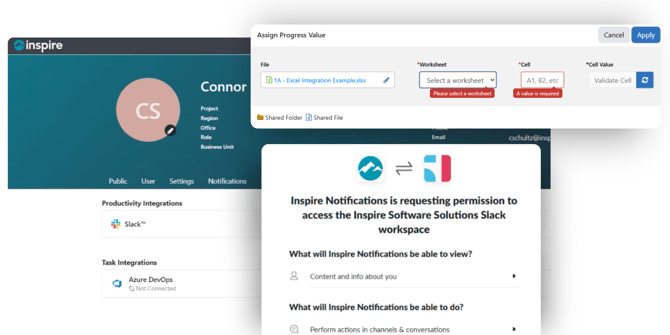
Excel: Integrate strategic, team, and individual key results with Excel for a comprehensive overview.
Slack: Receive Inspire notifications within your Slack workspace, staying informed and connected.
Additional Enhancements
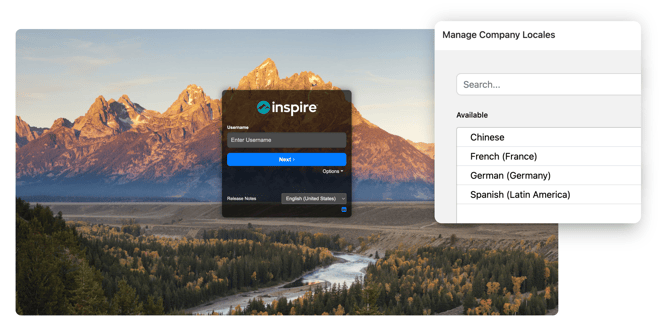
Refreshed login experience: Enjoy enhanced security and a sleek new look with our updated login interface.
Localization: We are thrilled to announce that Chinese is now available as a locale, making our platform more accessible to a broader audience.
These updates are designed to provide you with a more intuitive, efficient, and secure experience. Stay tuned for more exciting features in the future!
If you have any questions about our newest features and updates from the 9.1 release, please contact us at support@inspiresoftware.com.
Version 9.0 Release Highlights
At Inspire Software, we are dedicated to empowering organizations with our latest 9.0 release, featuring the new Objective Explorer for detailed tracking, Strategy Narrative updates for clearer action items, and Public Objective Conversations to enhance collaboration. These enhancements are designed to streamline workflows and drive organizational success.
Objectives
Introducing the Objective Explorer
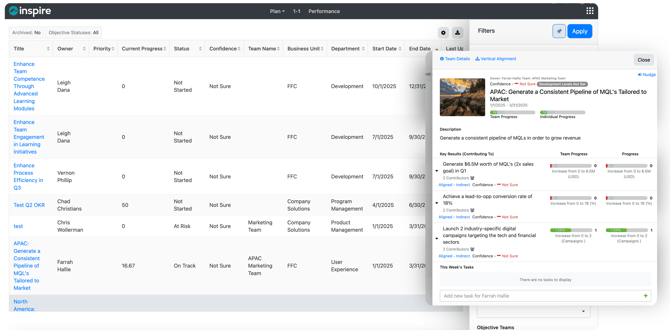
Our new Objective Explorer offers a comprehensive overview of all your objectives, neatly displayed in an intuitive list format based on the filters you apply. This powerful tool appears directly within the Objectives module, allowing you to set and refine filters to display precisely the data you need. Each objective is presented with sortable columns such as Owner, Priority, Current Progress, Objective Status, Confidence (if enabled), Team Name, and Business Unit. Clicking on any title opens a detailed Objective side-panel for in-depth insights.
Strategy Narrative Updates: Clarity at Every Step
We've enhanced our Strategy Narrative with updates that provide clearer action items and improved visualization of CKR status. These updates make it easier to summarize and communicate your strategies, ensuring everyone is aligned and moving in the same direction. A new link in notifications allows users to access narratives directly, streamlining the workflow even further.
Public Objective Conversations: Collaborate Openly
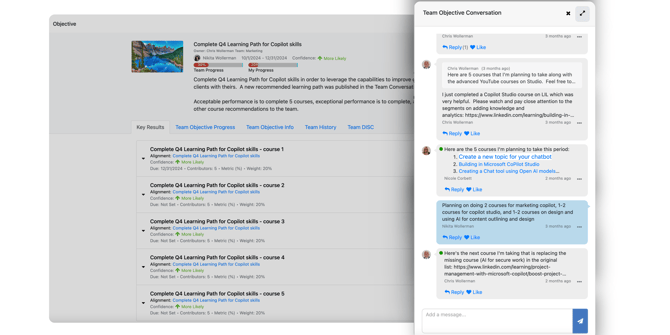
Collaboration reaches new heights with our Public Objective Conversations feature. When enabled, users can add discussions on public OKRs, fostering open communication and collective progress.
More Objective Enhancements
Key Result Owners now have the ability to edit any KR they own, ensuring accuracy and up-to-date information.
Our rich text editor for status updates has been upgraded to enable users to add or clear formatting in their check-ins, making updates more informative and visually appealing.
Reports
Enhanced Reporting Capabilities
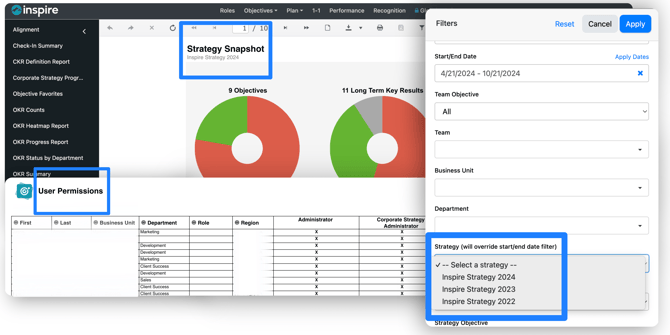
Inspire Software 9.0 brings several improvements to our reporting features:
- Revised custom report archived filter
- Strategic confidence added to reports if enabled for your organization
- Enhanced Strategy Snapshot report with additional details
- Now filter to a specific strategies in Check-in Summary, OKR Summary, and OKR Trends reports
- New Permissions report to see which users in the organization are assigned security permissions
Administration
Administration Enhancements
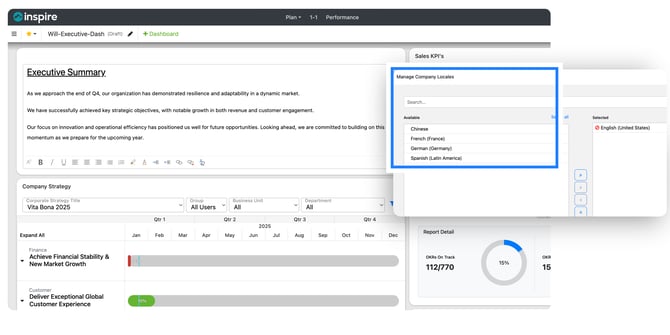
We’ve made several updates to streamline administrative tasks:
- German is now available as a locale
- New Notes widget for Company dashboards, allowing Admins only to edit and update notes visible to anyone with access to the Dashboard
Inspire Software 9.0 is more than just an update; it's a leap forward in organizational excellence. Discover these features and more to see how our latest release can transform your organization's productivity and success.
Meet Your New Digital Assistant Coming Soon: Inspire Copilot ChatBot
(Currently in Beta Testing)
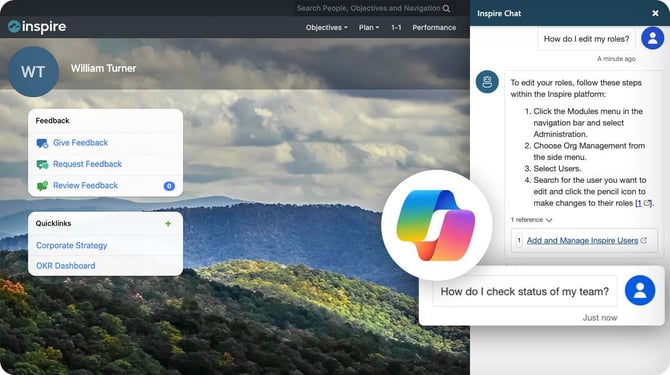
Navigate the capabilities of Inspire with the help of our new ChatBot, powered by Open AI and Microsoft Copilot technology. Currently in beta testing, this cutting-edge tool is designed to enhance your Inspire experience, providing answers and guidance pulled from our knowledge base. While our Copilot AI is not yet foolproof, it represents our commitment to bringing you the latest in AI technology.
Your Feedback is Welcome
While we are dedicated to refining Inspire Copilot AI's capabilities, we welcome your feedback. It is helpful and appreciated, but not a requirement. Rest assured, we are proactively improving the ChatBot to better serve your needs.
If you encounter any troubles finding the answer you are looking for with our new ChatBot, our comprehensive knowledge base remains the most reliable resource for accurate answers. Whether you're seeking quick information or detailed guidance, the knowledge base is your go-to solution. We appreciate your patience and contributions as we perfect this innovative feature.
Version 8.3 Release Highlights
Unleash your organization’s potential with the latest features and enhancements of Inspire 8.3, designed to streamline task delegation, enhance strategy communication and business reviews, and improve performance management.

Version 8.3 Release Highlights
Assign Tasks
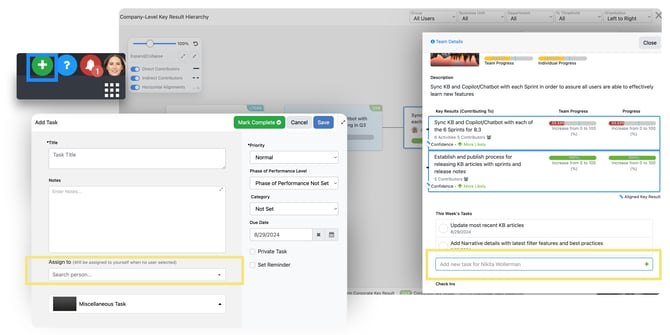
Enhance your planning and task execution with the new Assign Tasks feature! Allow users to effortlessly delegate tasks across the organization, ensuring clear responsibility and alignment with team objectives and projects. Ideal for project managers and team leaders, it simplifies workload distribution. With task assignment built directly into Inspire, users can manage tasks related to OKRs and roles without the need for external communication.
Strategy Narrative Subscriptions & Enhancements
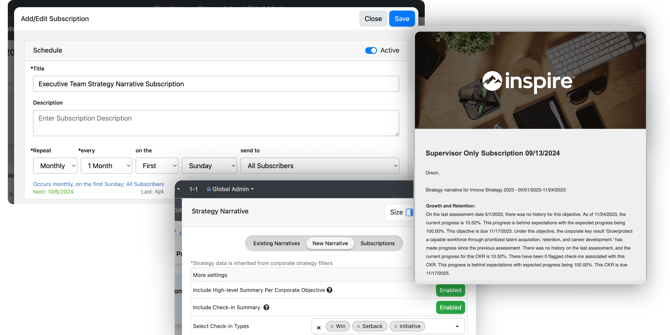
The Strategy Narrative feature is invaluable for maintaining transparency and alignment across your organization. Corporate Strategy Administrators can now create Subscriptions for Strategy Narratives, automatically sending narratives to subscribers on a defined cadence. This enhancement reduces the administrative burden of manual narrative creation and ensures key stakeholders receive regular strategic updates via email.
Corporate Strategy Admins can enable a subscription to be open for all users in the organization to subscribe and receive the emailed narrative, or it can be set as closed to a specific group in the organization.
Additionally, the new enhanced filter options for manually and automatically generated Strategy Narratives provide more flexibility and precision in your strategic updates.
Performance Management
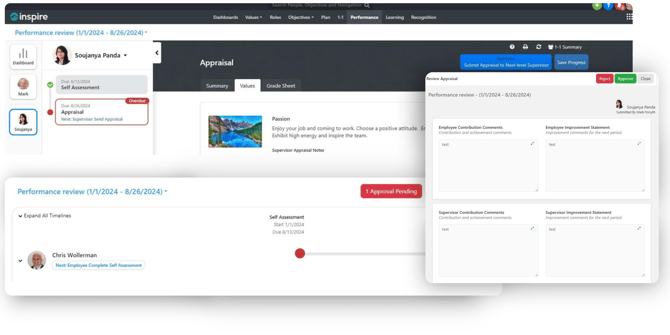
Improve the quality of performance reviews and appraisals with our new upgrade to Performance Management. If your organization enables the optional Next Level Supervisor Approval, supervisors' managers must review, then approve or reject appraisals submitted by their direct reports.
By involving skip-level managers in the appraisal review, the feature encourages more personalized coaching and provides constructive feedback, contributing to the development of managers.
Additional Enhancements
Objectives
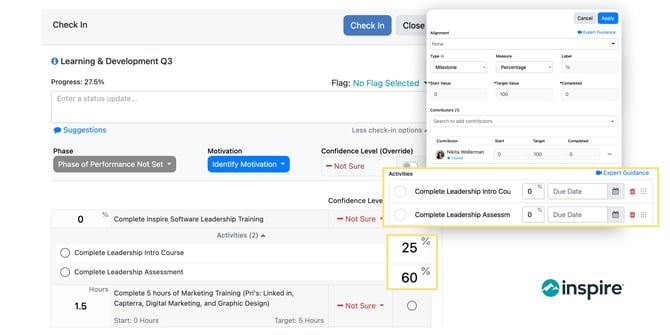
Users can now set activity completion percentages to indicate progress on an activity associated with a key result. Amplify transparency and minimize external communication for important initiatives with this feature.
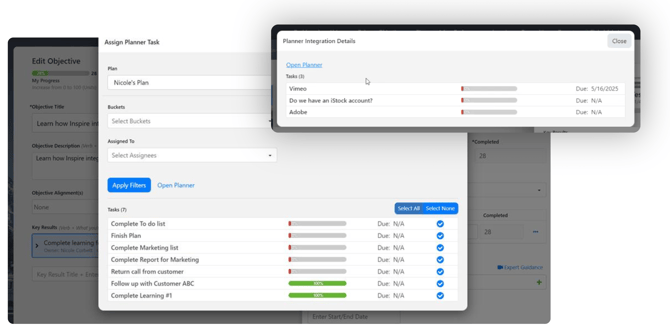 We have strengthened Inspire’s integration with MicroSoft Planner for better task management. You can now view all Planner Tasks linked to key results without having to edit the OKR. Additionally, we've made it easier to integrate key results with Planner and include all tasks that match your filter(s).
Reports
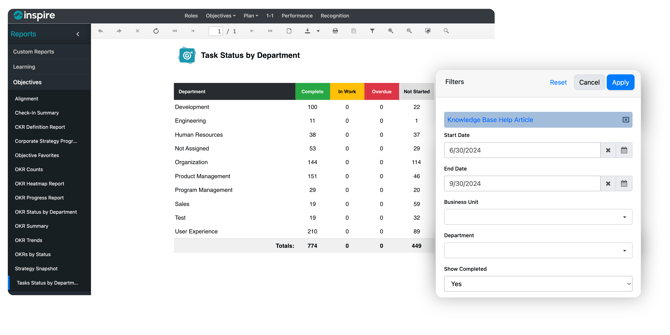
- The Task Status by Department report provides a high-level overview of task progress and completion.
- Access help articles easily from the filter panel within reports.
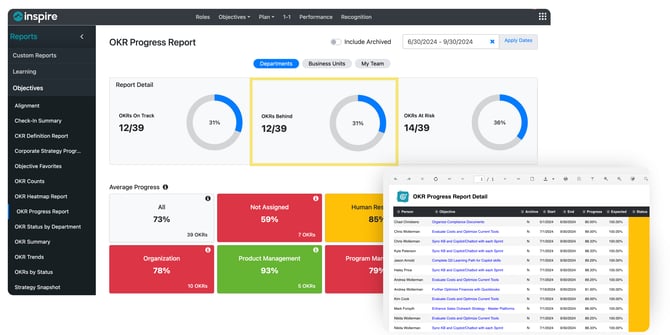
- A new option allows you to drill down by status in the OKR Progress report.
Dashboards
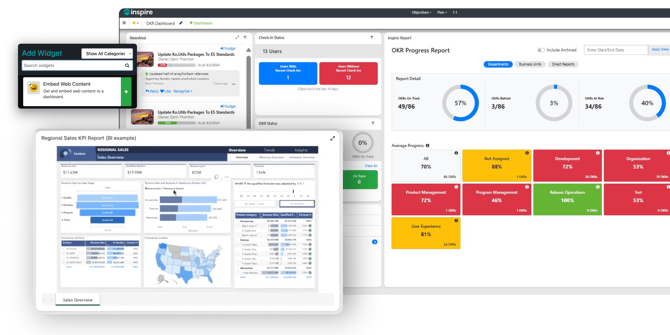
- The Embed Web Content widget allows users to easily embed reports in dashboards from outside sources such as Power BI, Tableau, or Looker.
- Expand dashboards and dashboard widgets to full screen for smoother and more comprehensive view during presentations.
These updates are designed to provide you with a more intuitive experience in Inspire, helping you achieve your goals with greater ease and precision. We are committed to continuously improving our software to meet your needs and exceed your expectations!
Version 8.2 Release Highlights
In the latest 8.2 release of Inspire, experience the revolutionary Strategy Narrative AI Widget, our new Microsoft Planner Integration, and more capabilities to increase productivity and collaboration.

Strategy Narrative AI Widget
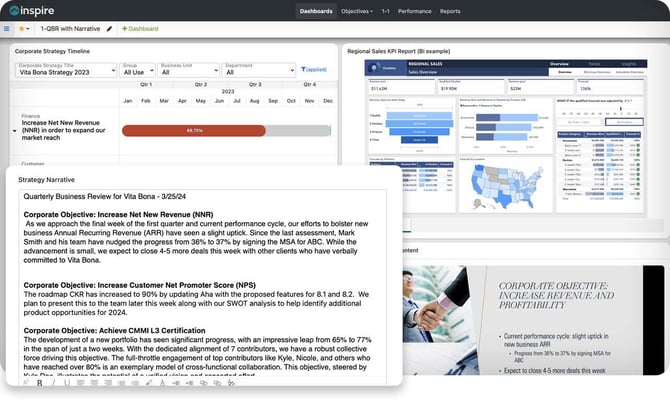
Empower your strategic planning and monthly or quarterly business reviews with Inspire 8.2, featuring the revolutionary Strategy Narrative AI Widget. Experience a seamless integration of insights and updates from key contributors, all in one intuitive view. With Inspire 8.2, you're not just planning; you're setting the stage for success.
- Leverage additional Strategic Narrative capabilities to generate a comprehensive MBR/QBR presentation using Microsoft Copilot® with a single click.
Microsoft Planner integration
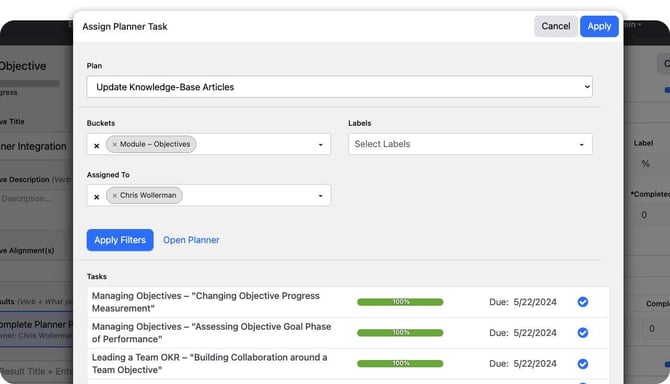
Say goodbye to juggling multiple project management tools. The latest Inspire release introduces a game-changing Planner integration, positioning Microsoft Planner at the forefront of project management. In addition to our standard integration of calendar and tasks with MS Outlook, ToDo and Planner tasks, our new Planner integration feature allows you to synchronize tasks with key results and track your project's progress with unparalleled ease.
Meet Your New Digital Assistant: Inspire Copilot (Currently in Beta Testing)
Navigate the complexities of Inspire with the help of our new ChatBot, powered by Open AI and Microsoft Copilot technology. Currently in beta testing, this cutting-edge tool is designed to enhance your Inspire experience, providing answers and guidance pulled from our knowledge base. While our Copilot AI is not yet foolproof, it represents our commitment to bringing you the latest in AI technology.
Your Feedback is Welcome
While we are dedicated to refining Inspire Copilot AI's capabilities, we welcome your feedback. It is helpful and appreciated, but not a requirement. Rest assured, we are proactively improving the ChatBot to better serve your needs.
If you encounter any troubles finding the answer you are looking for with our new ChatBot, our comprehensive knowledge base remains the most reliable resource for accurate answers. Whether you're seeking quick information or detailed guidance, the knowledge base is your go-to solution. We appreciate your patience and contributions as we perfect this innovative feature.
Version 8.2 Features
Corporate Strategy: A Game-Changer for Your Business
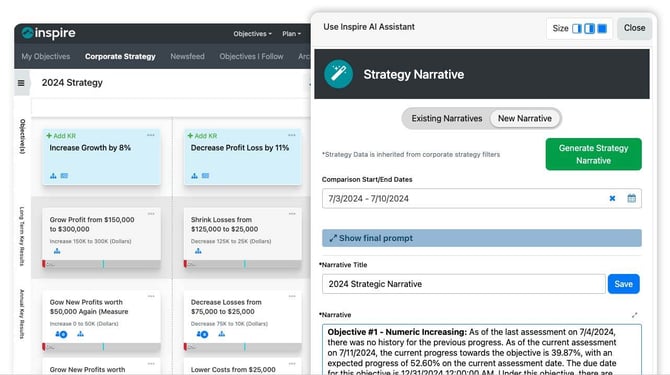
Are you ready to take your corporate strategy to the next level? With Inspire 8.2, you can do just that. This latest version of our software offers a suite of features that will help you create, manage, and communicate your strategic vision with clarity and confidence. Here are some of the highlights of what you can expect from Inspire 8.2's corporate strategy module:
- Create and manage strategic narratives that can be saved, exported to MicroSoft Word® for external use, or showcase them on dashboards with the new Narrative Widget.
- New strategic capabilities now exist to allow the indirect alignment of Corporate Key Results (CKR) and Long Term Key Results (LTKR).
- Gain quick insight on Objective progress by Nudging owners to provide timely updates.
- Gain deeper strategic insights into your business trajectory by setting a confidence levels on Strategic Objectives and Key Results.
Take Your Objectives to the Next Level
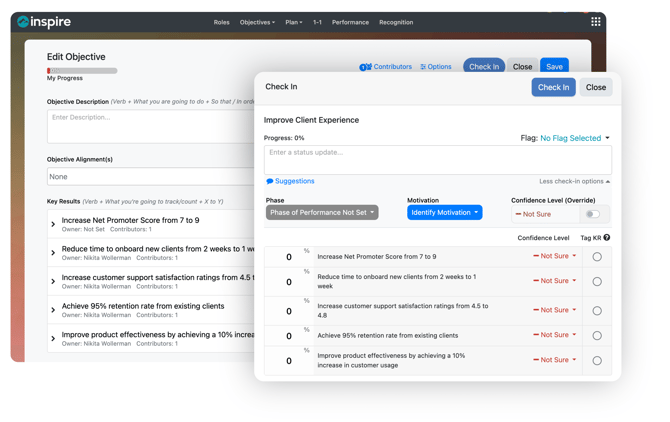 Version 8.2 offers a range of features that make creating, tracking, and aligning objectives easier and more effective. Here are some of the benefits you can enjoy with Inspire 8.2's objectives module:
- Use decimal values for weighting key results to increase flexibility.
- Check-in on Objectives with improved features and a refined user interface.
- Objective activities can now be marked off during the Check-in process to help better define progress.
- Sync key result progress with external integrations, such as MicroSoft Planner®.
- View alignment hierarchy, contributor updates, and progress from enhanced Check-in history using the side panel.
Seamless Planner Integration
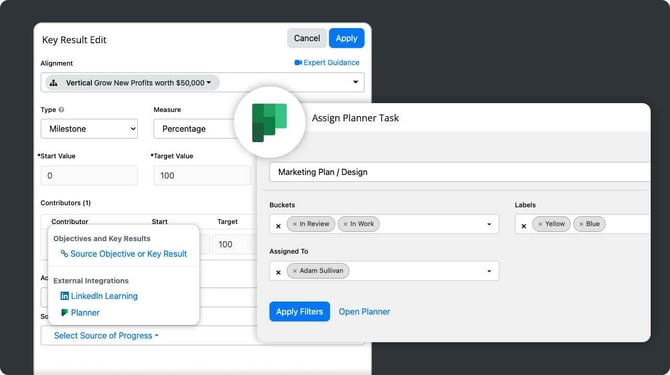
Key Results integration with Microsoft Planner® automates key result progress tracking based on task completion, revolutionizing how you manage projects.
Reports
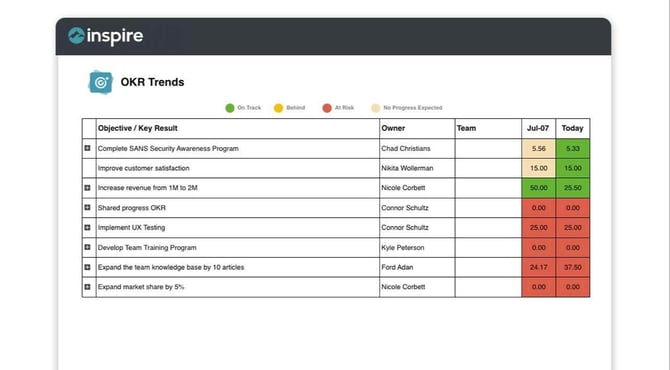 The OKR Trends report offers a clear view of progress trends for individual and team OKRs, while the OKR Counts report provides an enhanced understanding of OKR counts throughout your organization.
Additional Enhancements

- New rich text editing capabilities for 1-1 conversations.
- New dashboard capability to Embed Tableau content.
- View all award history for yourself or your direct reports in the User Profile
- Administrators can control the display of 1-1 Execution Percentage within the Performance Dashboard
Version 8.1 Release Details

Version 8.1 Release Details
Work Groups and Teams
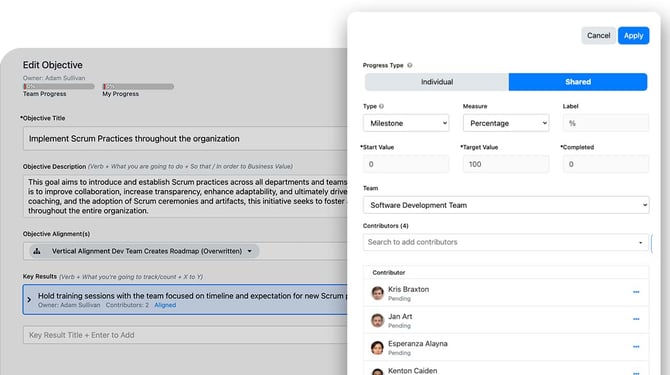
Inspire now makes teams and work groups first class citizens by allowing team leaders to quickly build, track and report on team objectives, progress and other insights throughout the application.
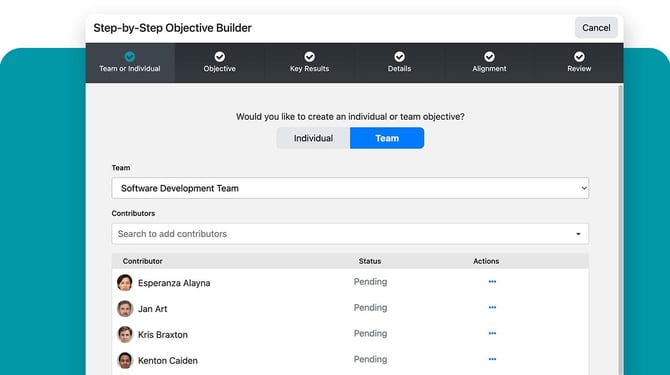
- Allow selection of teams within the objective editor and step-by-step builder
- Provide teams filters for all new objective reports
Reports & Analytics
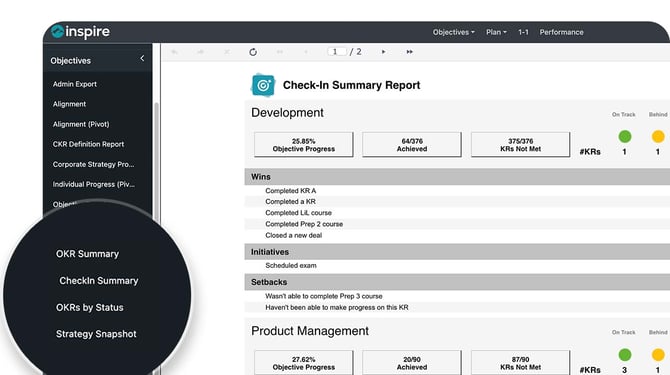
Three amazing new reports to show objectives, progress and key status updates by team as well as helpful insights by department, business unit and region. Perfect for quarterly business reviews or regular team meetings!
- OKR Summary Report - Summarize OKR progress and confidence, group by team/department/business unit.
- OKR Counts Report – The OKR Counts Report now includes overall company statistics, and the ability to drill down and view OKR counts for all employees.
- Check-in Summary Report – view all flagged check-ins grouped by Team, Business Unit or Department.

Integrations
A native integration with Domo for rich data experiences along with our new integration with Finch which provides Inspire easy access to over 100 other HRIS and payroll systems including Workday, ADP, UKG, SAP and many more to empower organizations with data-driven workforce insights and process automation.
- Domo integration administration
- User selection of Domo integration within Key Results
- Expose HRIS data through Finch integration
Improved AI
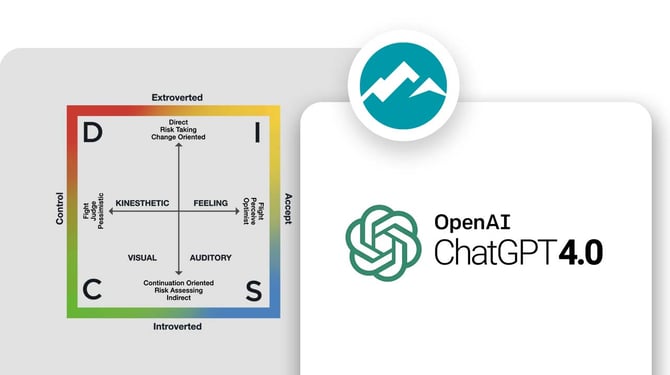
Inspire continues to be the leader in AI prompts with expert guidance from the industries top leadership development authors and consultants.
- Added ability to access multiple AI models including GPT 3.5 and 4.0
- Integration of DISC personality types into performance AI prompts
Objectives
Now setup shared progress key results to allow any contributor to update progress for the team and improve tracking of activities within key results.
- Shared Progress Key Result - Set up a team key result that is shared progress, so that all contributors can update the overall key result completion.
- Measure Key Result Progress by Activity Completion - Set up a key result's progress to be driven by activity completion. As activities are marked complete, key result progress will update automatically.
- Add a Team to an Objective - Within the step-by-step builder and objective editor, select a team to assign everyone as a contributor to the objective.
- Flag a Check-in - Flag a check-in as a win, setback, or initiative to differentiate important status updates.
- Set Objective and Key Result Confidence Level - Indicate confidence in achieving an objective or key result to provide status to stakeholders.
- Replace the read-only objective modal with the slide-out panel - Provide more context and progress history by opening a side panel when clicking an objective title from places like Reports, the Profile, and Performance.
Version 8.0 Release Details


Enhanced AI Assistance
- Implementing AI features in all of the major modules of Inspire including Objectives, Corporate Strategy, 1-1, Performance, and Recognition.
- Access the Inspire AI Assistant in all tabs of a Performance Self-Assessment or Appraisal
- Inspire AI Assistant added to 360s Assessments and optionally utilize the recipient’s DISC in your assessment summary.
- Simple shortcuts available to quickly refine AI prompts.
- Inspire AI Assistant is available when writing a Description of Achievement for an award in Recognition.

Localization
- Fully localized Objectives and Performance modules
- Enhanced localization of 1-1 and Weekly Plan modules

Reports
- Enhanced Custom Report to include Tasks and Numeric KR Data
- Filter for filtering to Team or Individual Objectives only for the OKRs by Status and OKR Status by Department reports

Objectives
- Check-Ins
- Added Suggestions for Check-ins
- Default status update entered when updating key result progress.
- Objective Step-by-Step Builder
- Create an individual or team objective in the revised builder.
- Create an individual or team objective in the revised builder.

Corporate Strategy
- Cascade a strategic key result to a group of users.
- Filter the Strategy by public group.

Key Results Enhancement
- Track Numeric Key Result progress by Actual instead of Difference to make it easier for users to input their actual progress vs putting in the difference of progress.
- Linked Key Results – Select another Objective or Key Result as your key result’s source of progress.
- Key results will inherit the attributes and progress of the source of progress.